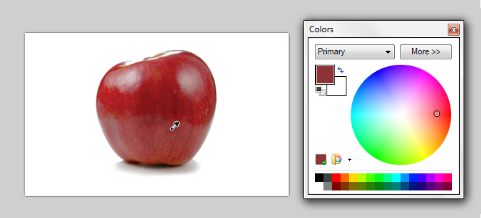
The Color Picker Tool is used to transfer a color from the active layer to either of the Primary or Secondary color slots.
To use the tool, activate it and click on the active layer.
The color of the pixel under the cursor will be installed to the Primary color ( Left Mouse button )
or the Secondary color ( Right Mouse button ).
Example - Picking a color
Transferring the color of a pixel in the active layer to the Primary color slot.
Tip
The Color Picker Tool is easiest to use when zoomed in on an image with the Pixel Grid enabled.
Sampling Modes
The Color Picker Tool has two sampling modes, Image and Layer.
These dictate which pixels will be sampled when picking a color.
Sampling Modes
Image - pixels are polled from the composite image when determining the color to install in the color slot.
This mode will operate in the same way as if a multi-layered image was flattened prior to using the Color Picker Tool.
Tip
The keyboard shortcut for the Image mode is to hold down the Ctrl key when clicking.
Layer - pixels only within the active layer are polled to determine which color will be installed in the color slot.
This is the same sampling mode as found in earlier versions of Paint.NET.
Sampling Size
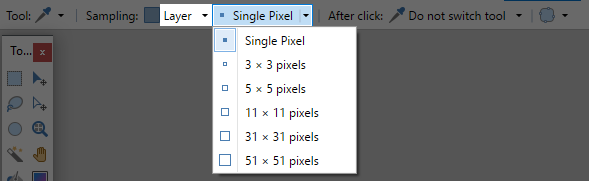
The Color Picker Tool has six sampling sizes that can be used. These are squares in the sizes one pixel, 3x3, 5x5, 11x11, 31x31 and 51x51.
The size determines the area that will be polled when determining the color that is installed.
Where a range of colors is covered by the sample size, the colors will be averaged and a single hue returned.
Sampling Sizes
After Click
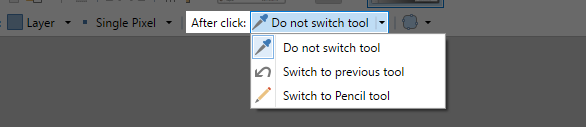
The Color Picker Tool has three actions which can be performed following the picking of a color.
After Click Actions
Do not switch tool leaves the Color Picker tool active following the picking of a color.
Switch to previous tool, once a color has been picked, the tool last used will be reactivated.
Switch to Pencil tool this option activates the Pencil tool once a color has been picked.