History Window 
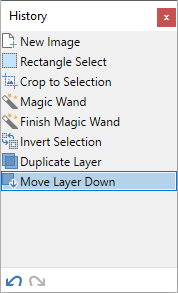
Every action performed on an image within the current session is listed in the
Show/Hide the History Window
The
Clicking the History icon or pressing
Resetting the History Window location
The window can be reset to its original position and size (including docking) by pressing
Relocating the History Window
The
Using the History Window
Every action performed on an image in the current session is added to the list in the
Note
Closing Paint.NET or closing the image itself removes the entire editing history, clearing it entirely. There is no way to recover an images' editing history once Paint.NET or the image is closed.
The history list can be used to step backward or forward through the changes made to the image.
To review the changes to the image, use
Tip
Toggle between one entry and the previous one by clicking repeatedly on the same entry in the
If an action has been undone, it appears in the list with a grey background. These actions may be redone by using
Warning
If a new action is performed while reviewing previous History actions, the new action will replace and erase all the remaining actions. It is not possible to recover history items replaced in this way.
History Window Icons
 Undo
Undo
This will undo the last action listed in the
 Redo
Redo
This will redo the last action that was undone.